
1Purpose
This document describes the rules that apply when roads, footpaths, cycle paths and other transport infrastructure are drawn and updated in Samgöngunet, the Icelandic Road Database (IRDB). The aim is for the network to be drawn the same way throughout the country, regardless of who does the drawing.
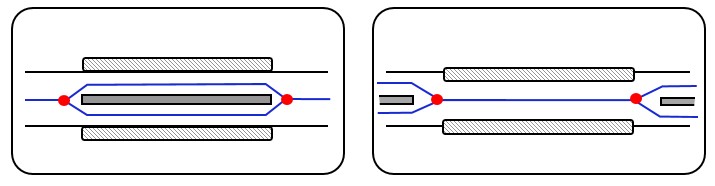
Bridges are exempt from the 200 m rule and are always drawn as they are.
2Definitions
The following terms are used in this document. Icelandic terms are given for reference.
- Samgöngunet IRDB
- The Icelandic Road Database. It holds data on roads, footpaths and cycle paths, their features, and various structures in the transport network.
- Road vegur
- The carriageway together with its shoulders. See Figure 1.
- Carriageway akbraut
- The part of the road intended for vehicle traffic.
- Lane akrein
- One of the parallel strips into which a carriageway is divided lengthwise, either by road markings or because each strip is wide enough for a single line of vehicles.
- Reference link viðmiðunarlína
- A line representing a road, carriageway, footpath or cycle path in Samgöngunet, usually along its centreline. A reference link runs between two nodes.
- Node nóða
- A point in the network where reference links meet or end, for example at junctions, at the end of a road, or where the pedestrian and cycle network connects to the road network. Nodes define how the network is connected.
- Topology grannfræði
- Information on how reference links connect to each other through nodes, independent of their exact shape.
- Geometry rúmfræði
- The shape and position of a reference link in coordinates. The geometry also determines the length of the link.
- Feature eiginleiki
- Information recorded on a reference link or part of one, such as surface type, road number, street name or speed limit.
- Road authority veghaldari
- The body responsible for a road, its operation and maintenance, usually Vegagerðin or a municipality.
3Responsibility
Samgöngunet is a joint project of Náttúrufræðistofnun (the Natural Science Institute of Iceland) and Vegagerðin (the Icelandic Road and Coastal Administration). Náttúrufræðistofnun builds and operates the system, while Vegagerðin owns the project and is responsible for the correctness of the data.
Road authorities are responsible for reporting changes to their roads so that Samgöngunet can be updated.
4Generalization rules
The network in Samgöngunet is a simplified representation of the real road network. To make the network consistent across the country, common rules are needed for how it is drawn. These are called generalization rules and are described below as briefly as possible.
The figures come from the generalization rules of the Swedish national road database (NVDB), and some of them contain Swedish text:
- Rätt – correct
- Fel – incorrect
- Före / Efter – before / after
- Statlig väg – state road
- Kommunal väg – municipal road
- Planskilt – grade-separated
- över / under – over / under
- Länk – reference link
- Slitlager – surface
- Grus / Belagd – gravel / paved
4.1General rules for road, pedestrian and cycle networks
Three basic rules apply to the whole network:
- The network must show how roads connect to each other, whether through junctions, roundabouts or bridges.
- The network must be legible when drawn on a map, so that individual roads and their connections can be told apart.
- The topology sometimes needs to be simplified, for example to prevent nodes from ending up too close together.
In addition:
- The network should not be split into short reference links unnecessarily. In the road network, nodes must be at least 5 metres apart. In the pedestrian and cycle network they may be as close as 2 metres.
- The network must be continuous, with no gaps.
- Parallel reference links that run very close to each other must not intersect.
- The road width of a reference link should normally not overlap that of adjacent links. The exception is a cycle lane on the carriageway, whose width is counted as part of the carriageway.
- When new network is added, the surrounding network must be taken into account. The existing network may first need adjusting so that lines do not cross by mistake and nodes do not end up too close together where the networks connect.
- No reference link, or group of reference links, may be isolated from the rest of the network. The only exception is islands with neither a fixed road link nor a ferry service.
4.2Road network
This section describes the rules that apply to the road network.
4.2.1Basic rule for drawing roads
The reference link should follow the centreline of the carriageway. A single carriageway gets one line. Where carriageways are separated, for example by a barrier or a median, one line is drawn for each direction of travel.
The line should be as straight as possible. Local widenings, such as parking bays, bus stops or overtaking lanes, should be ignored.
To know where the line should go, it is important to distinguish between lane, carriageway and road; see Figure 1 and the definitions.
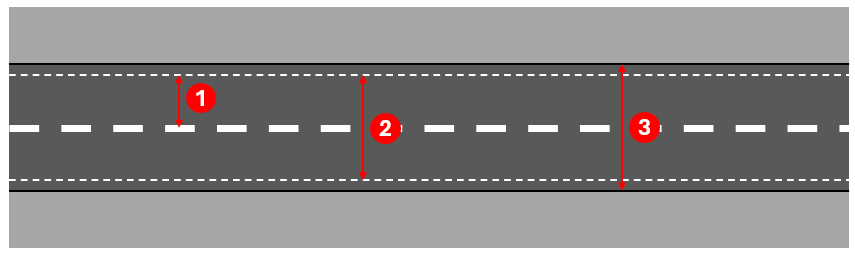
The table shows where the reference link goes for the most common road types.
| Road type | Position of the reference link | Illustration |
|---|---|---|
| Ordinary road or street | Centre of the carriageway, one line for the whole road. | 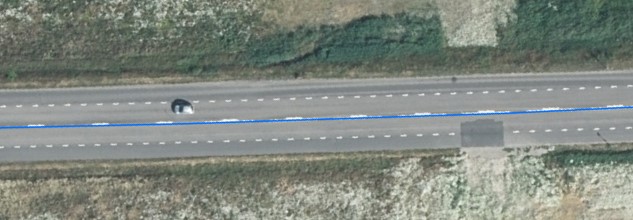 |
| Separated carriageways between two junctions | Centre of each carriageway, one line per direction. | 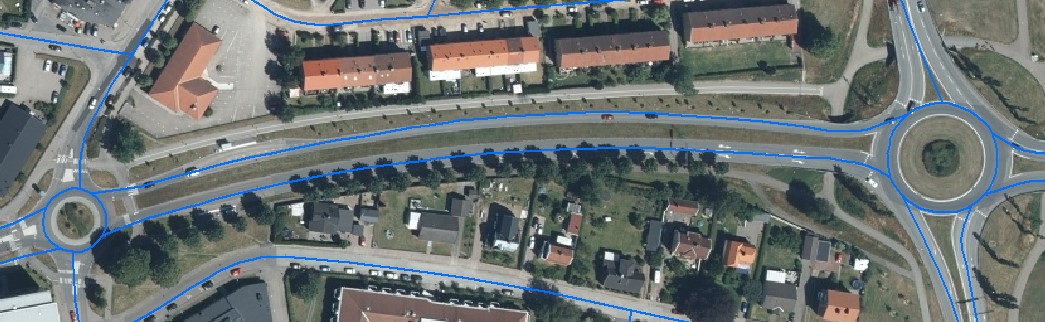 |
| Carriageways separated over a stretch of 200 m or more | Centre of each carriageway, one line per direction. | 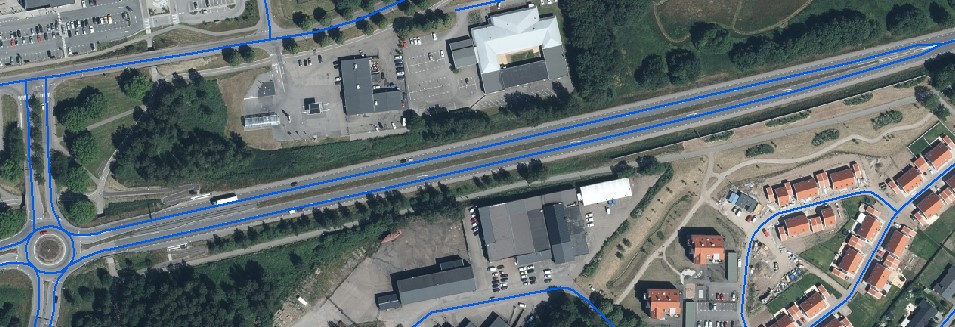 |
| 2+1 road with a median barrier | Centreline of the outer lane, one line per direction. | 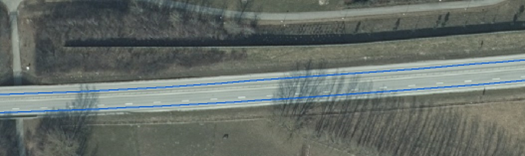 |
| 2+2 road with a median barrier | Centre of each carriageway, one line per direction. | 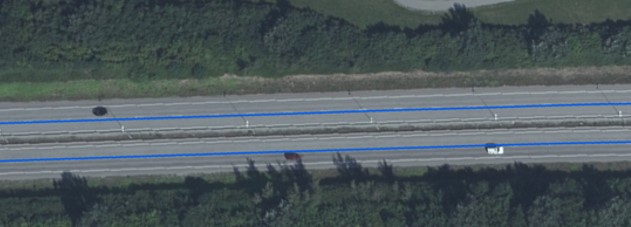 |
| Multi-lane road, e.g. four lanes | Centre of the carriageway. If the carriageways are separated by a barrier or median, one line per direction. | |
| Motorway or expressway | Centre of the carriageway in each direction. The line does not always coincide with a painted lane line. | |
4.2.2Exceptions to the basic rule
In a few cases the basic rule is set aside so that the reference link does not swing back and forth between lanes.
1. Mixed 2+2 and 2+1 road. The road has two lanes in one direction throughout, and alternates between one and two lanes in the other. The line follows the left lane, which stays continuous along the whole stretch; see Figure 2.
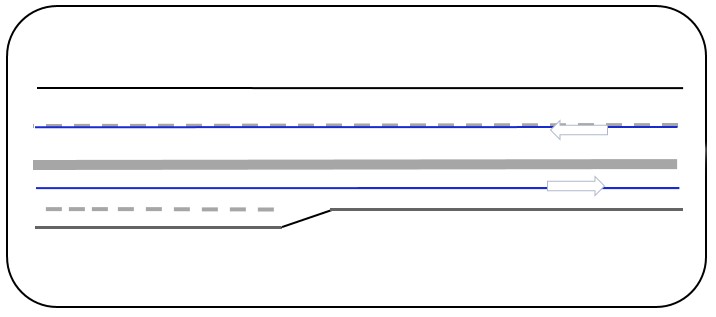
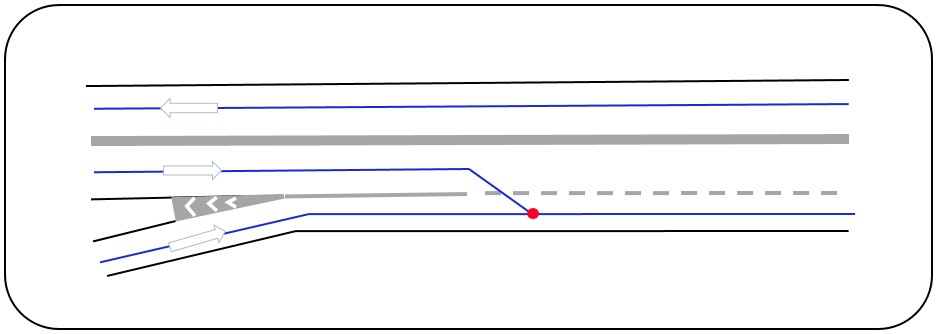
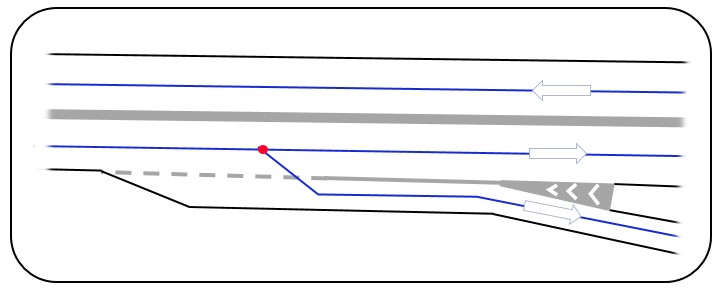
2. Long entry ramp. Where the right lane is a long entry ramp, the line continues along the left lane and does not veer into the right lane; see Figure 3 and Figure 4.
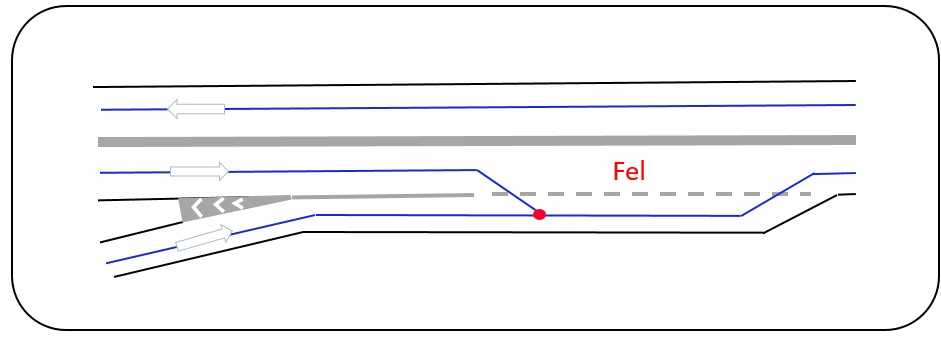
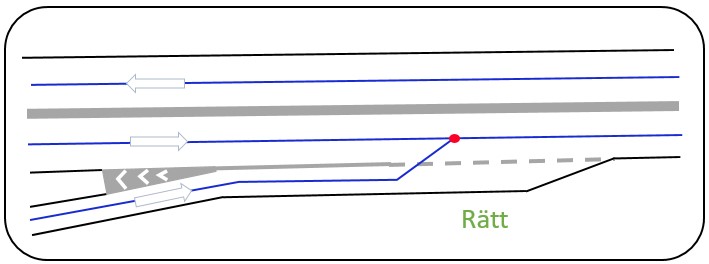
3. Ramp becomes a lane. At interchanges on 2+1 roads, an entry ramp often continues as a lane, so one lane becomes two. The reference link then moves out to the outer lane, as the basic rule requires; see Figure 5.
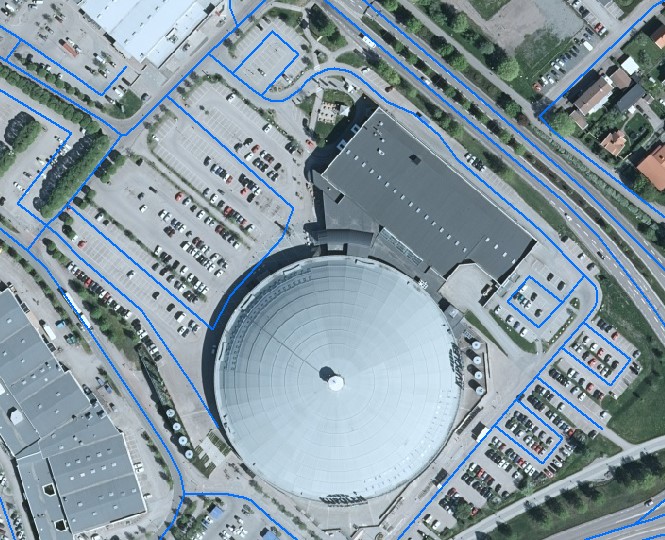
4. Car parks and open areas. In open areas with defined driving routes, such as large car parks, reference links may be drawn along the main routes; see Figure 6.
4.2.3Continuity rule
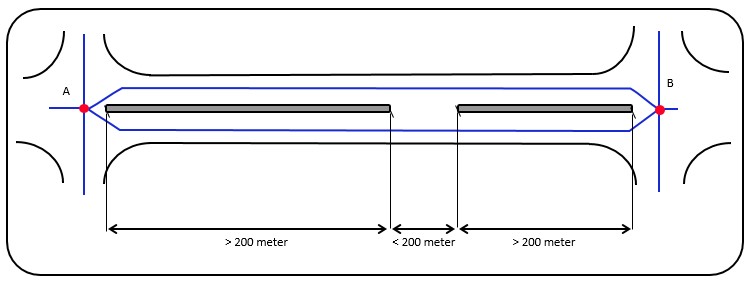
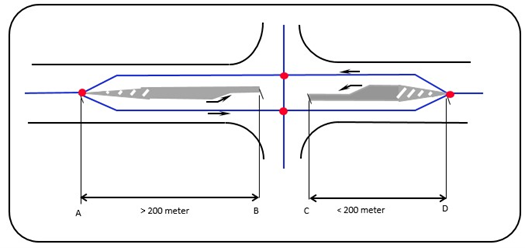
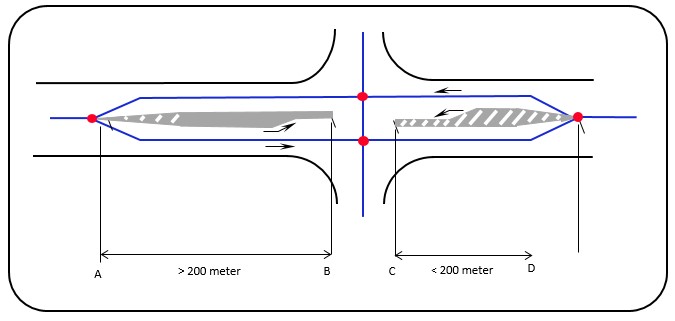
Avoid switching back and forth between one and two reference links where carriageways are separated over short stretches. If a stretch is shorter than 200 metres, the representation in the network should not change, even if the separation is interrupted in reality, for example by a short gap in the barrier or at a junction.
When judging the length of a separation, only consider what separates the carriageways, such as a barrier, a median or painted separation. Roads joining the stretch do not interrupt it.
Example 1. Two separate reference links are drawn all the way between nodes A and B, because the gap in the barrier is shorter than 200 metres; see Figure 7.
Example 2. If either stretch A–B or C–D is longer than 200 metres, two separate reference links are drawn all the way from A to D; see Figure 8.
Example 3. Painted separation (such as a hatched area or a no-overtaking marking) can also lead to two separate links; see Figure 9.
Bridges
The 200 metre rule does not apply to bridges. A bridge is always drawn as it is, regardless of its length. If the bridge has two carriageways with a barrier or other obstacle between them, two reference links are drawn. If it has one carriageway, one link is drawn; see Figure 10.
Example of the continuity rule
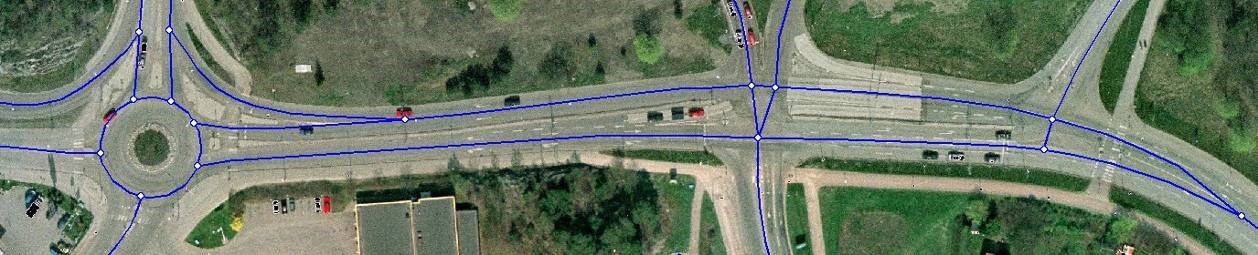
In Figure 11 the carriageways are separated by medians from the roundabout to the T-junction on the right. East of the T-junction, painted separation divides the traffic.
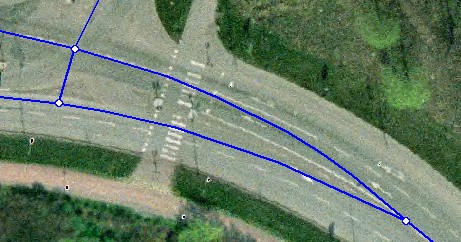
To keep continuity, the reference links do not merge into one node until the painted separation ends, at the pedestrian crossing on the far right; see Figure 12.
4.2.4Node placement
In the road network, nodes are placed only:
- where roads intersect at grade (the node is placed where the reference links cross),
- at the ends of roads,
- where a road connects to the pedestrian or cycle network.
The length of a reference link between two nodes (measured in the horizontal plane) must be more than 5 metres. If a short link created at a junction would be shorter than 5 metres, the links are merged into a single node.
An exception applies where the road network connects to the pedestrian and cycle network. There, nodes may be as close as 2 metres, but never closer.
Nodes at painted separation
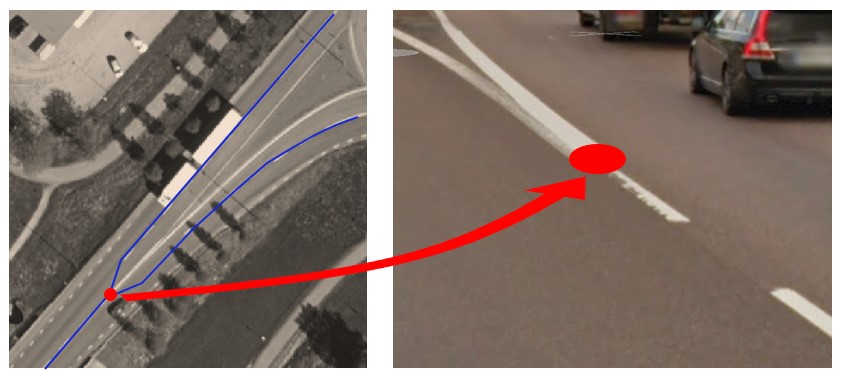
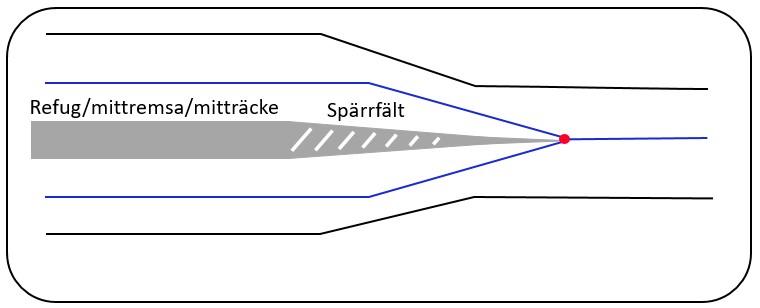
Where carriageways are separated by painted separation (a hatched area), the node is placed where the separation begins or ends; see Figure 14.
Where two links become one
Where two carriageways, drawn as two reference links, merge into one, the node is placed where the painted separation ends; see Figure 15.
4.2.5Start and end of reference links
A node is placed where a road begins or ends. This is usually obvious, but the examples below help in less clear-cut cases.
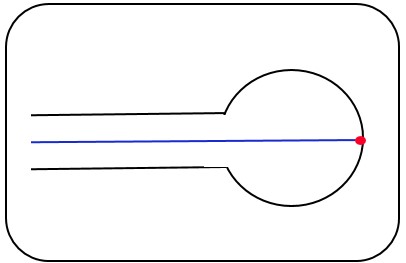
Road ending in a turning area
Where a road ends in a turning area or another large open area, the node is placed where the reference link meets the far edge of the drivable surface; see Figure 16.
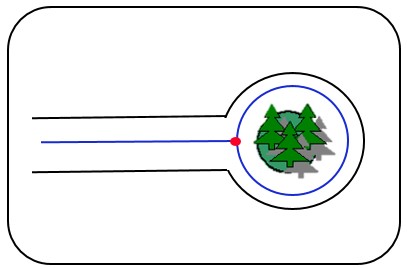
Road ending in a turning loop
Where a road ends in a turning loop with an island in the middle, the reference link should follow the loop as it actually is; see Figure 17.
4.2.6Junctions and roundabouts
The basic rules in section 4.1 apply to all junctions and roundabouts. In addition, each case must be judged on its own merits. The rules below cover only the most common situations.
- First, make sure all connections (possible movements) are represented.
- Then follow the dimensions for traffic islands and separation (section 4.2.6.12).
When a new road is added to a junction, the junction as a whole must be reassessed before deciding where the nodes should go.
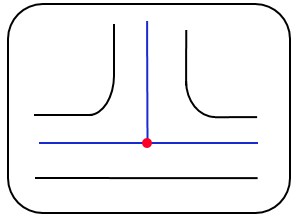
4.2.6.1Simple T-junction
In a T-junction the node is placed where the reference links cross; see Figure 18.
4.2.6.2T-junction with separated carriageways
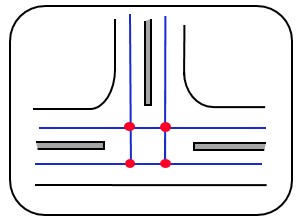
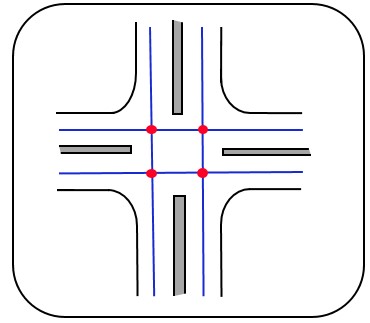
If all roads at the junction have separated carriageways, the basic rule gives four nodes, provided that no link becomes shorter than 5 metres; see Figure 19.
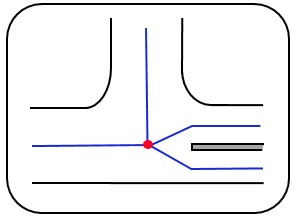
If only one road has separated carriageways, there is one node; see Figure 20.
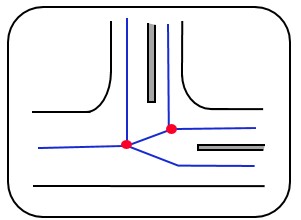
If two roads have separated carriageways, there are two nodes; see Figure 21.
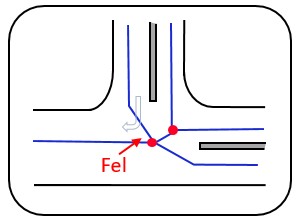
In junctions of this type, sharp angles should be avoided where possible. Figure 22 shows an incorrect solution where a sharp angle causes problems for routing from north to west.
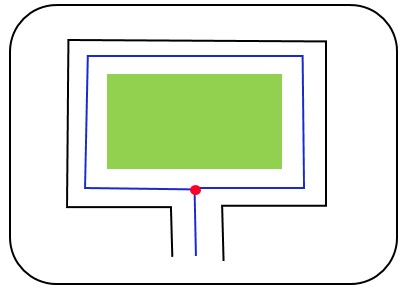
4.2.6.3T-junction with a loop
Where a road connects to a loop, it is always drawn with two separate reference links: one for the loop and one for the road leading to it. A node is placed where they meet; see Figure 23.
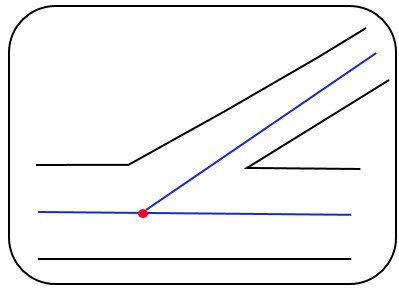
4.2.6.4Skewed T-junction
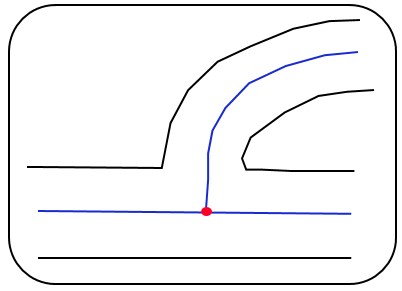
The reference links should reflect how the junction is built. The basic rule also applies to skewed T-junctions, with the node placed where the links cross; see Figure 24.
In most cases, however, the road connects at a right angle, and the node is then placed as shown in Figure 25.
4.2.6.5Simple crossroads
At a crossroads the node is placed where the reference links cross; see Figure 26.
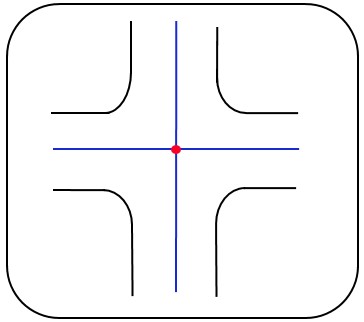
If all roads have separated carriageways there are four nodes, one at each crossing point, provided that no link becomes shorter than 5 metres; see Figure 27.
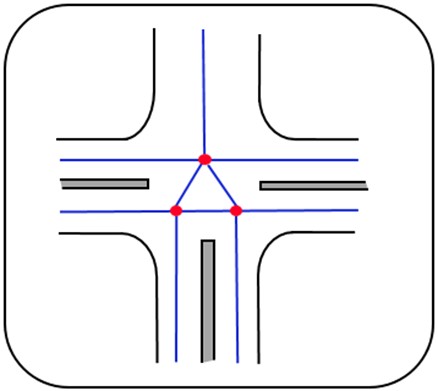
If three roads have separated carriageways and one does not, there are three nodes; see Figure 28.
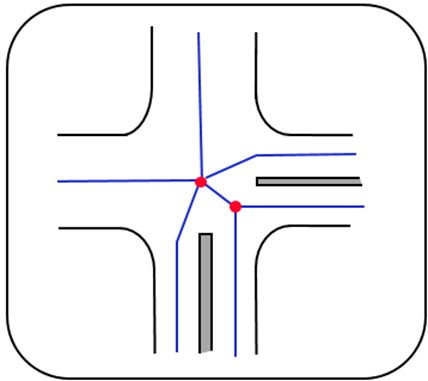
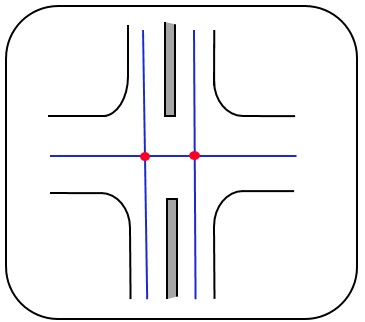
If two roads have separated carriageways there are two nodes. Figure 29 shows a case where the two roads are adjacent; sharp angles can be hard to avoid here. Figure 30 shows a case where they are opposite each other.
4.2.6.6Skewed crossroads
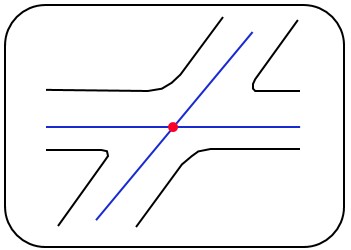
At a skewed crossroads the node is placed where the reference links cross; see Figure 31.
4.2.6.7Staggered crossroads
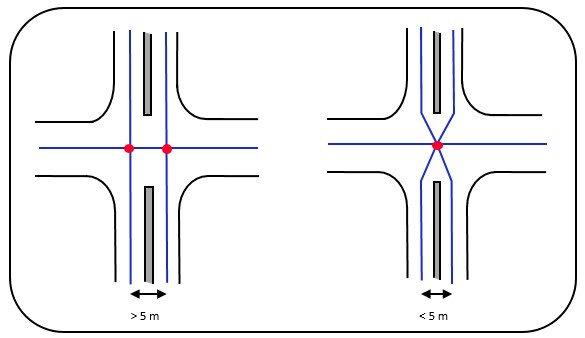
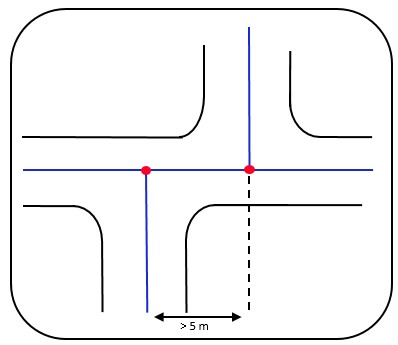
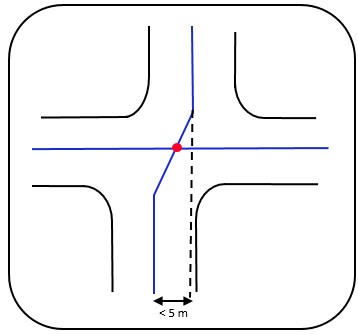
A staggered crossroads gets two nodes if the crossing points are more than 5 metres apart; see Figure 32. If they are less than 5 metres apart, it gets one node; see Figure 33.
4.2.6.8New road joining an existing junction
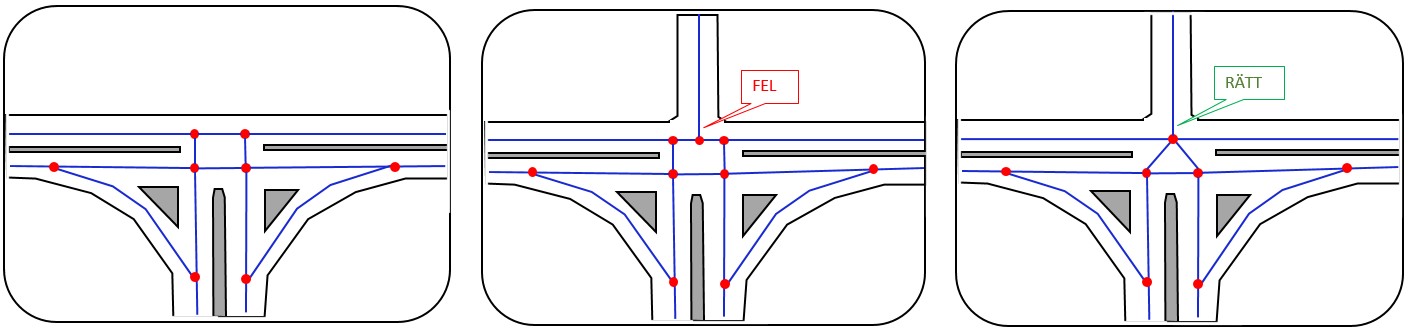
When a new road is added to a junction, the junction as a whole must be reassessed before deciding where the nodes should go.
In Figure 34 a new road has been connected to an existing junction. The middle drawing shows an incorrect solution, where the new road was simply attached without reassessing the junction. The drawing on the far right shows the correct solution.
4.2.6.9Roundabouts
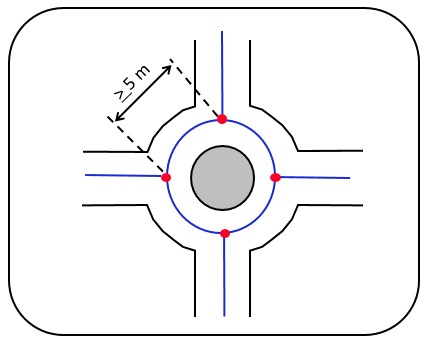
Roundabouts are drawn as designed, usually as a circle. Nodes are placed where the reference links of the approach roads meet the roundabout's link; see Figure 35.
Small roundabouts that are fully drivable, have no traffic islands, and where nodes cannot be at least 5 metres apart are always drawn as a single node. If there are traffic islands at the roundabout, the rules in section 4.2.6.12 apply.
4.2.6.10Junctions with a teardrop island
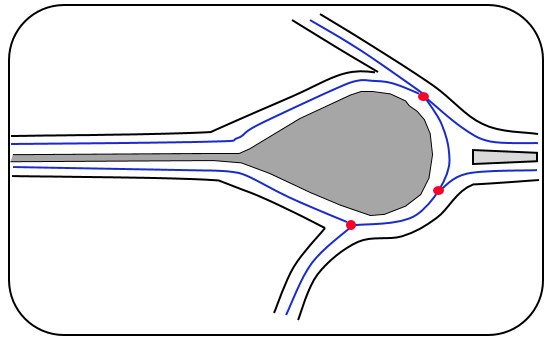
At junctions with a teardrop-shaped island, the node is placed where the hatched area or median begins or ends; see Figure 36 and Figure 37.
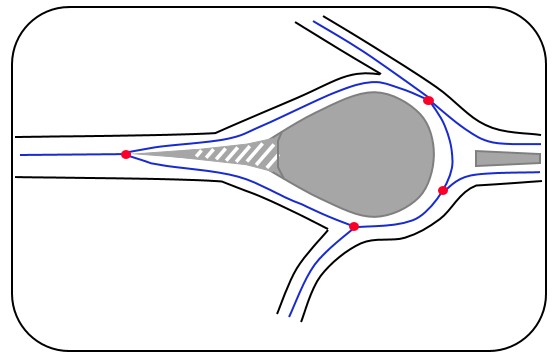
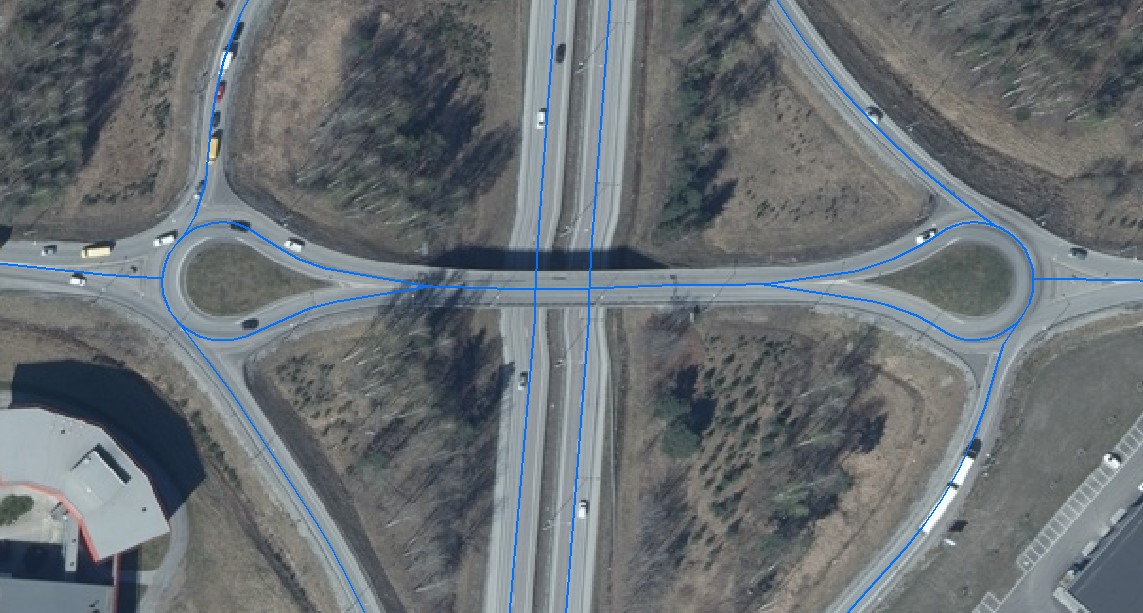
If there is a barrier or other physical obstacle between the carriageways, the links do not merge into one node at the end of the teardrop, but continue as two links according to the basic rule; see Figure 38 and Figure 39.
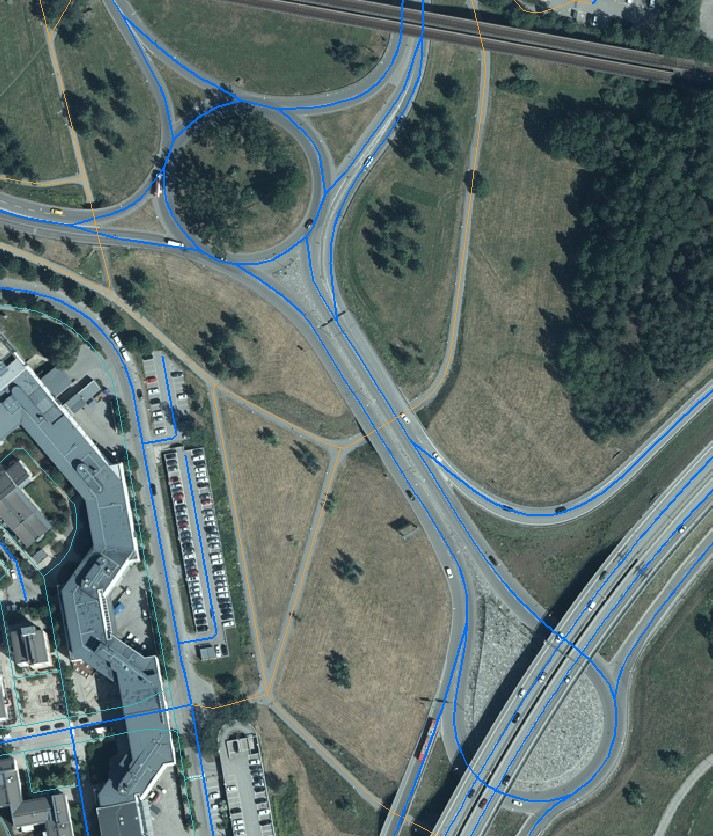
4.2.6.11On- and off-ramps
On- and off-ramps should connect to the main road immediately where the hatched area (or median) ends.
Preferably, the ramp connects as a natural continuation of its alignment, without crossing a median or hatched area; see Figure 40 and Figure 41.
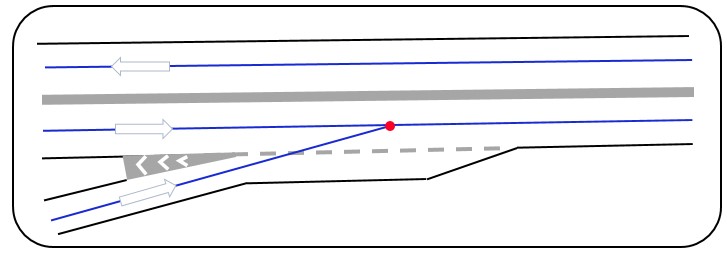
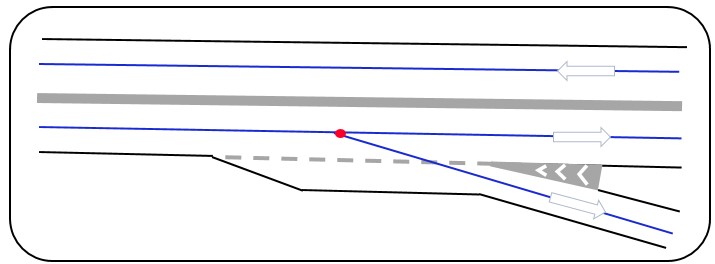
If that is not possible, the ramp is connected to the main road at an angle of about 45°, without crossing a median or hatched area; see Figure 42 and Figure 43.
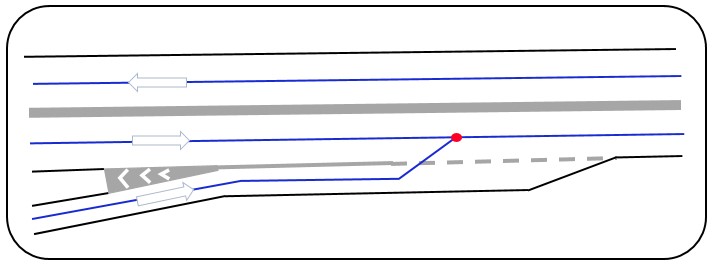
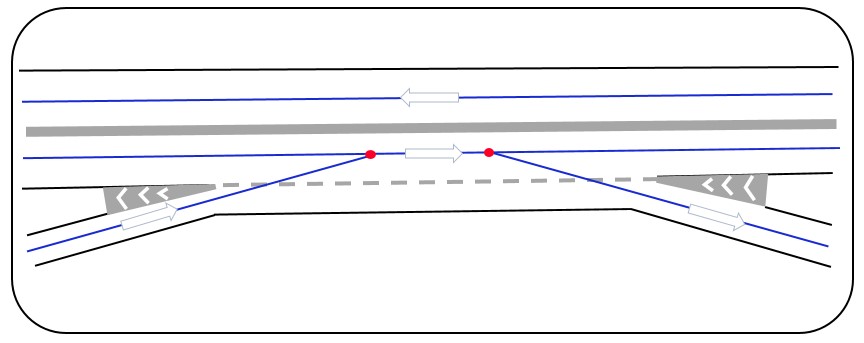
A weaving section, where an on-ramp immediately becomes an off-ramp, does not get its own reference link but follows the basic rule. If nodes would be less than 5 metres apart, a single node is used; see Figure 44.
4.2.6.12Traffic islands and hatched areas at junctions
Medians and hatched areas can cause one reference link to split into two. The following rules apply:
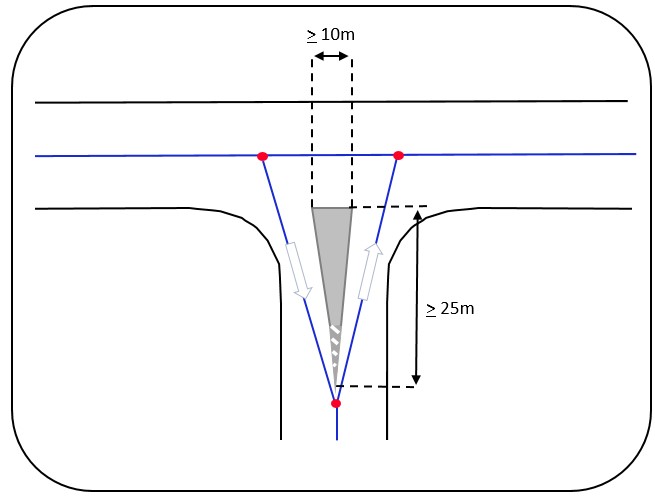
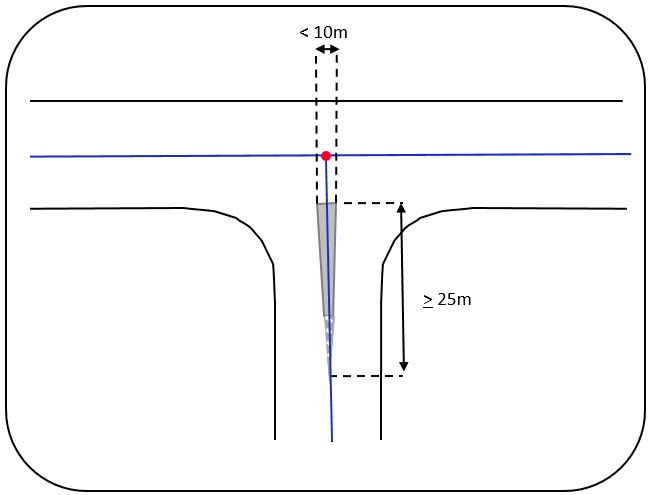
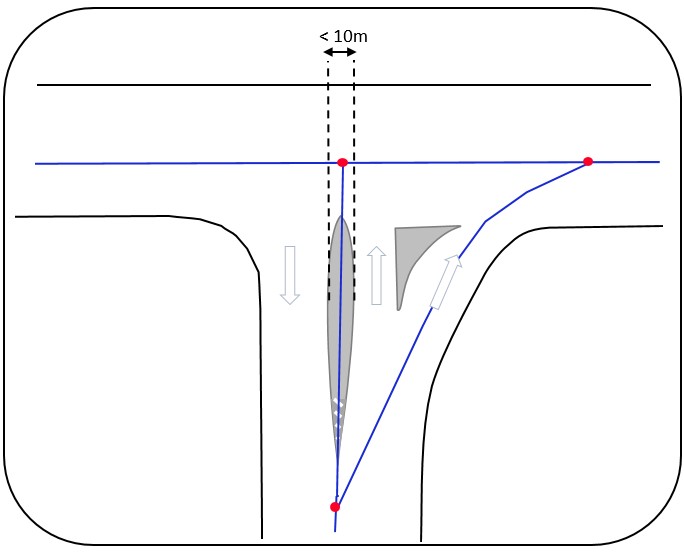
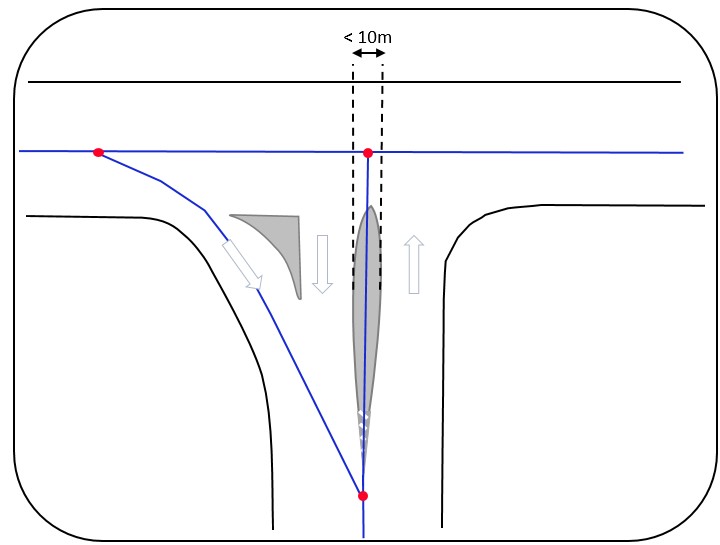
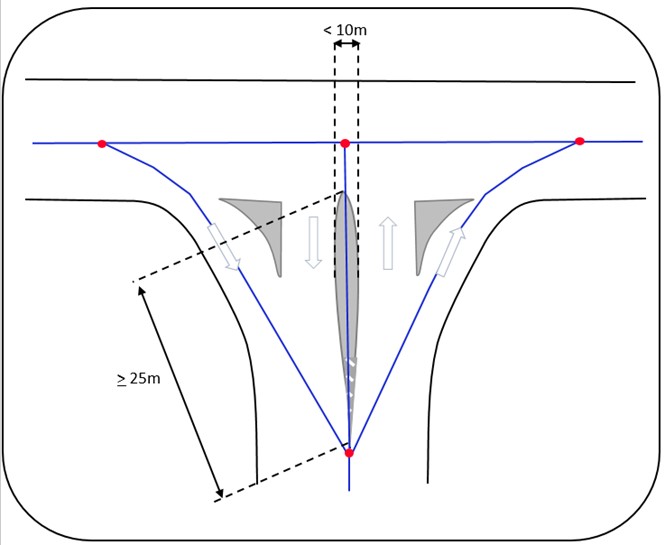
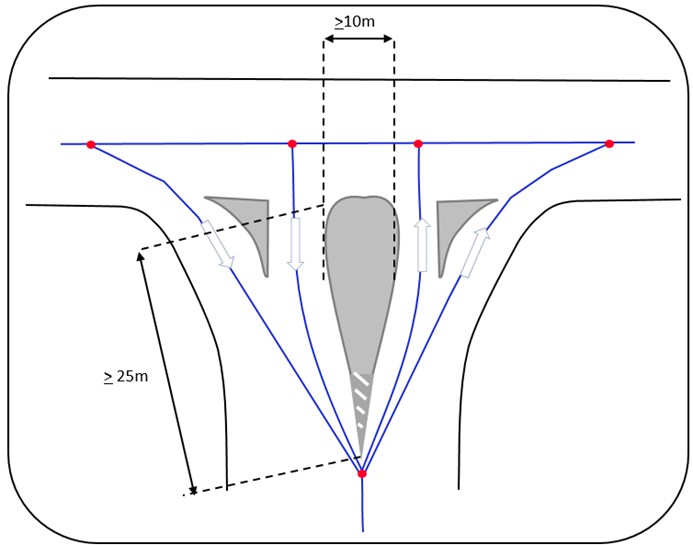
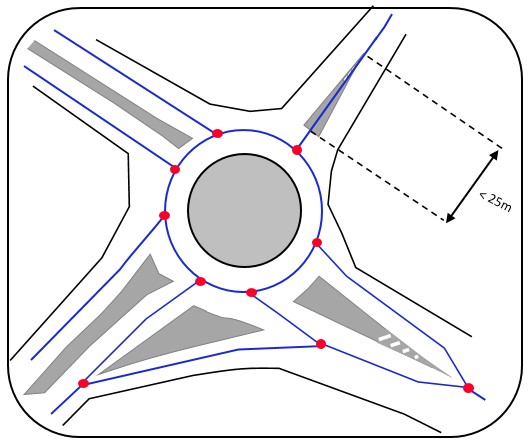
1. Medians separating opposing traffic. For the link to split, the longer side of the island must be at least 25 metres and the shorter side at least 10 metres. As a rule, only permanent physical obstacles, such as raised islands and barriers, are taken into account. A painted hatched area can also cause a split if information needs to be linked to a specific movement, or to describe how the network works at that location. A hatched area that measures at least 25 × 10 metres and is also marked with permanent physical features, such as road signs or bollards, is always drawn with separate links.
2. Islands separating traffic in the same direction (directional islands) always lead to separate links; see Figure 47–Figure 50.
3. Painted directional islands. So that traffic rules and other information can be linked to the correct movement, painted hatched areas separating traffic in the same direction also lead to separate links; see Figure 51.
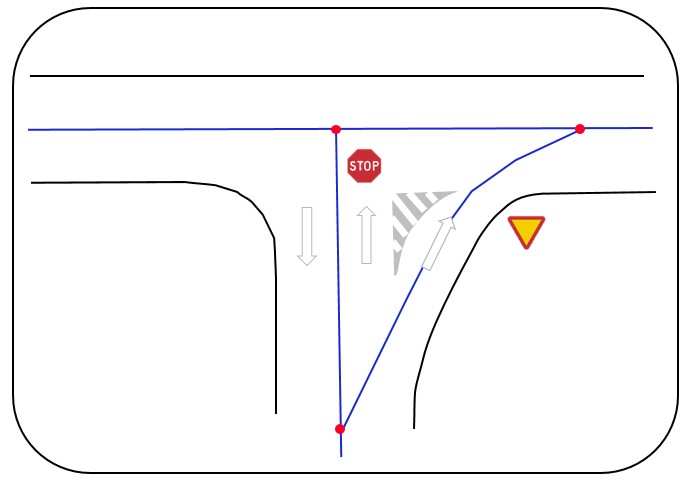
Figure 52 shows a roundabout with several different types of island.
4.2.6.13Complex junctions
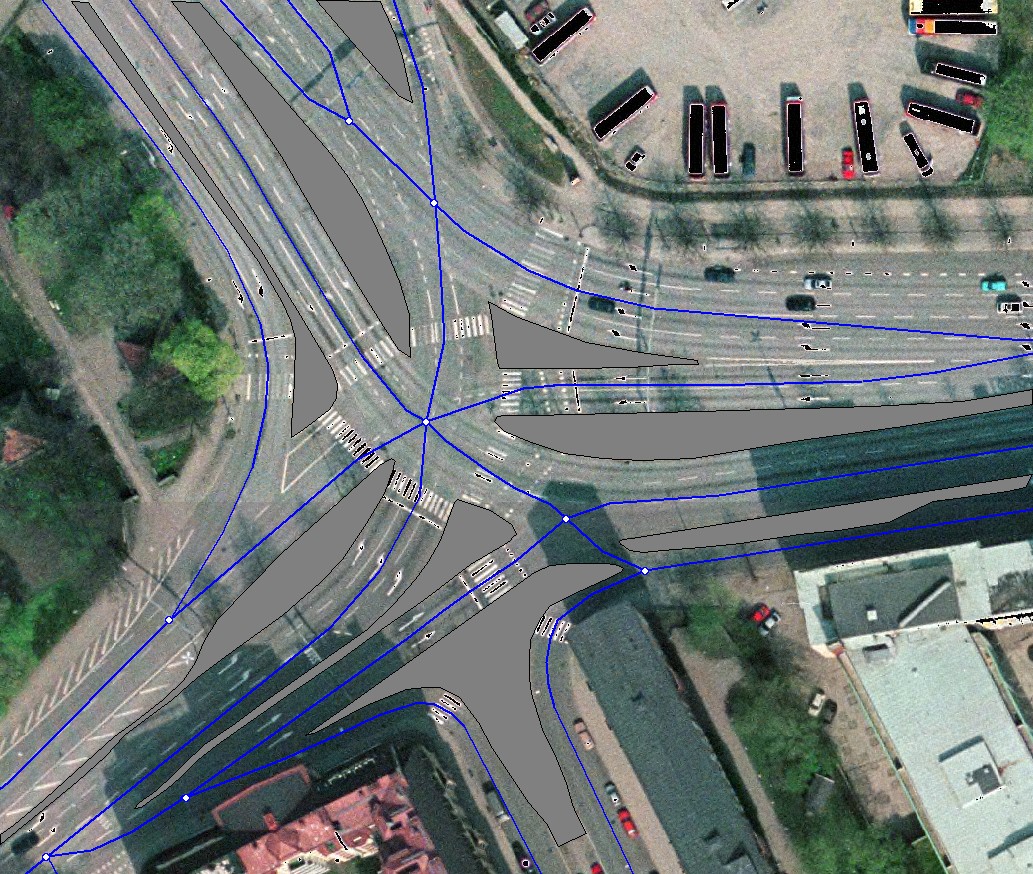
Topology takes precedence over geometry. A simple representation with correct connections is preferred over exact geometry. This is especially important where roads with separated carriageways meet. To achieve a simple and correct representation, without unnecessary nodes and links, requirements on shape, and sometimes even positional accuracy, often have to be relaxed within the junction. Otherwise the network risks being drawn differently depending on who draws it.
In complex junctions many reference links often meet. The first priority is then to make sure all connections are correct and all possible movements are represented. A good workflow is:
- Identify all medians and hatched areas that may lead to separate links.
- Draw the reference links that the separations require and extend them into the junction.
- Connect the links in the junction so that the topology is correct and it is possible to drive through.
- “Test drive” every movement and avoid angles smaller than 90° as far as possible.
4.2.7Turning points between carriageways
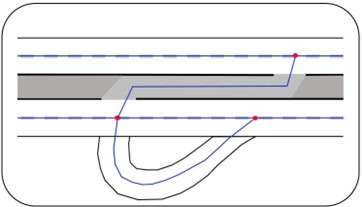
Where it is possible to turn around between separated carriageways, i.e. where the median is not closed off by a barrier or other obstacle, a cross-link between the carriageways should always be added; see Figure 54.
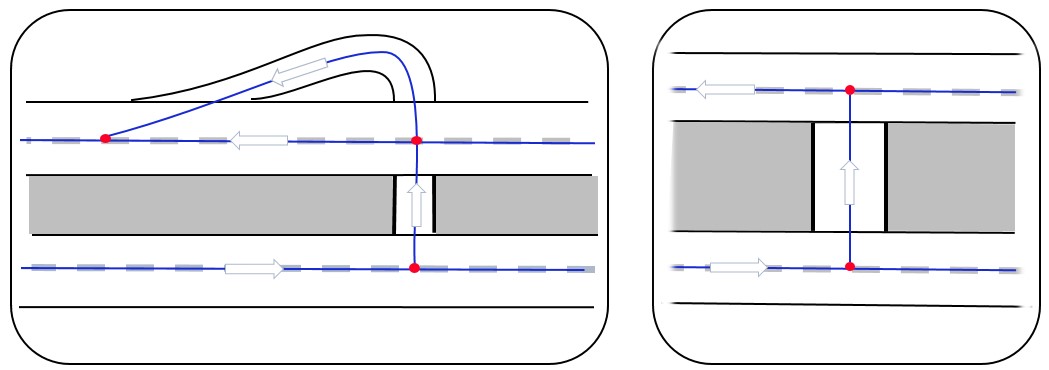
The cross-link should follow the actual vehicle movement at the site. Figure 55 shows an example where obstacles close off part of the area between the carriageways.
4.2.8Ferry routes
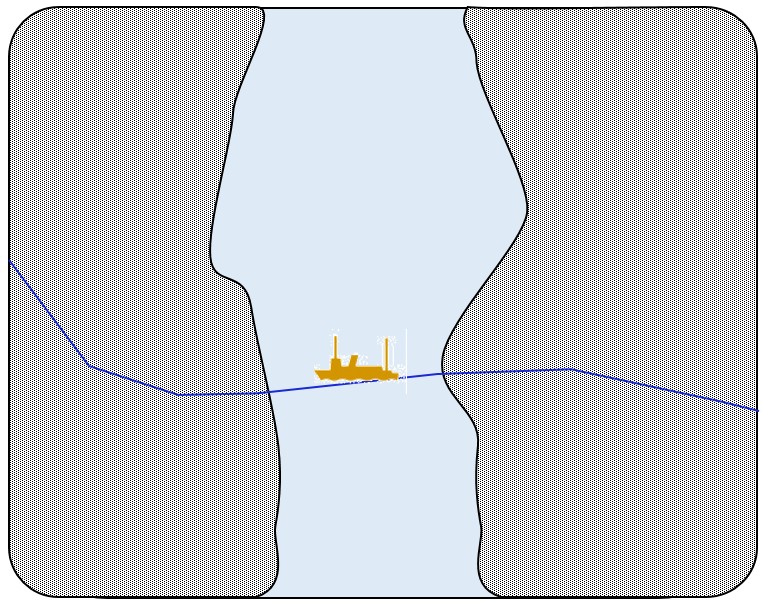
A ferry route is drawn as a line between the ferry terminals and should follow the ferry's likely course; see Figure 56.
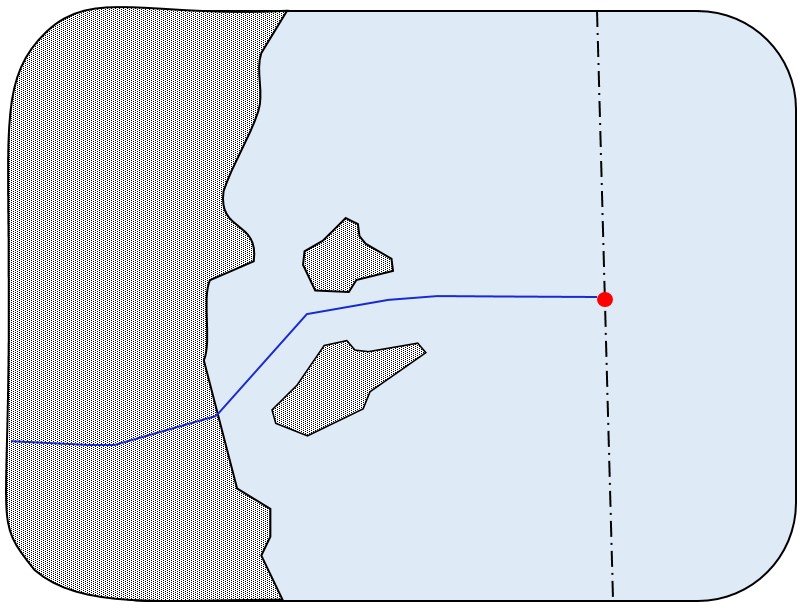
Ferry routes to other countries are drawn the same way, but end in a node at sea, at the territorial boundary in the direction of the destination; see Figure 57.
4.3Pedestrian and cycle network
This section describes the rules for the pedestrian and cycle network, i.e. footways, footpaths, cycle paths and cycle lanes.
4.3.1Basic rule
The reference link should follow the centreline of the cycle path, footway or cycle lane; see Figure 58.
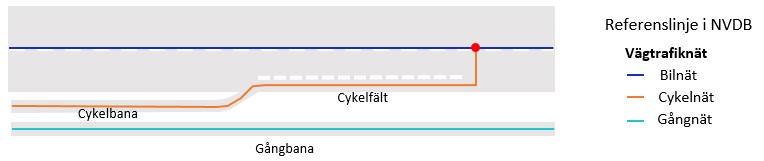
The figures below show typical cases and whether a pedestrian link, a cycle link, or both should be drawn. Traffic signs along the path (Figure 61) indicate what kind of path it is.
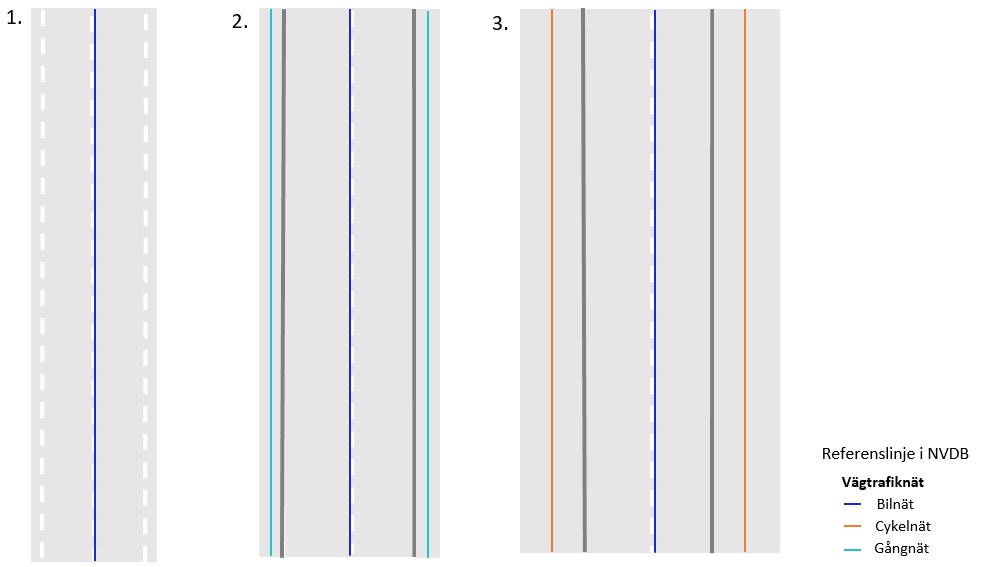
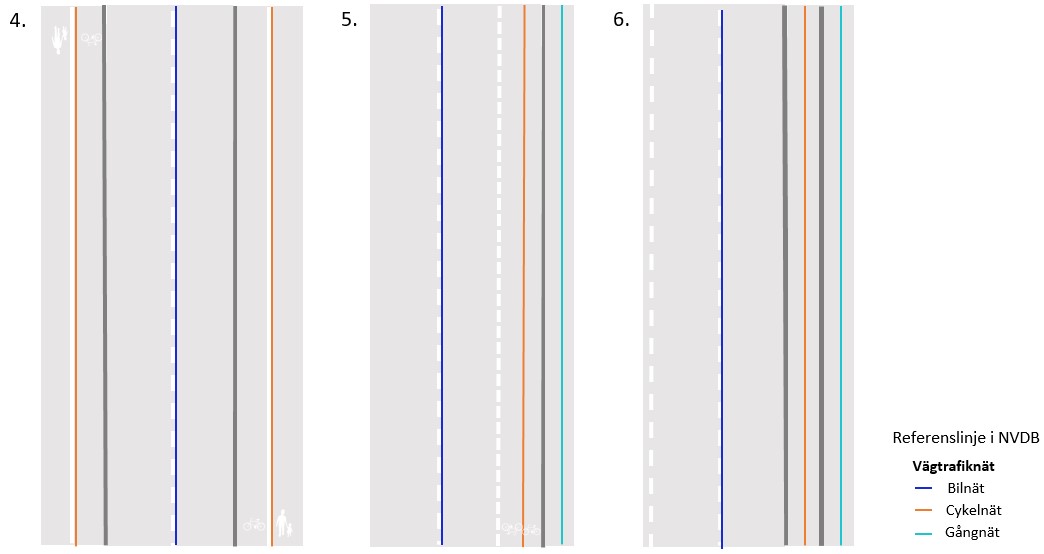
| # | Situation | What is drawn |
|---|---|---|
| 1 | Road with no dedicated space for pedestrians and cyclists | No link in the pedestrian and cycle network. |
| 2 | Road with a footway | A pedestrian link, one on each side if there are footways on both sides. |
| 3 | Road with a shared footpath and cycle path | A cycle link, one on each side if there are paths on both sides. |
| 4 | Footpath and cycle path divided into pedestrian and cycle parts by markings or similar | One cycle link. |
| 5 | Footway, plus a cycle lane painted on the carriageway | Both a pedestrian link and a cycle link. |
| 6 | Footway and cycle path separated by a permanent physical divider | Both a pedestrian link and a cycle link. Traffic islands alone do not split the pedestrian and cycle network. |
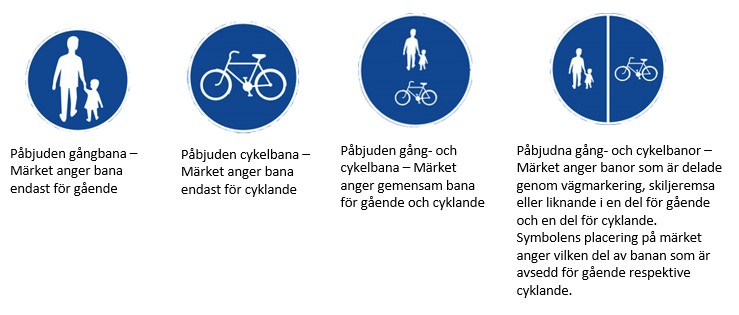
Figure 62 shows real examples of cases 4 and 5, and Figure 63 shows an example of case 6, where the path is split into two links because of a physical divider.
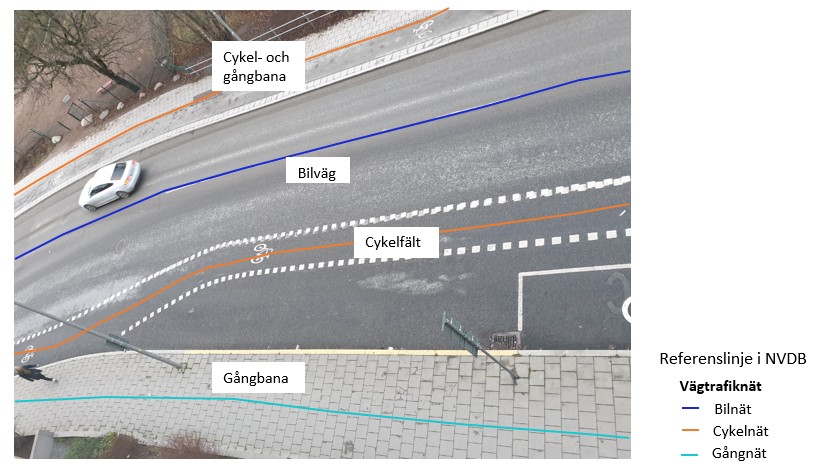
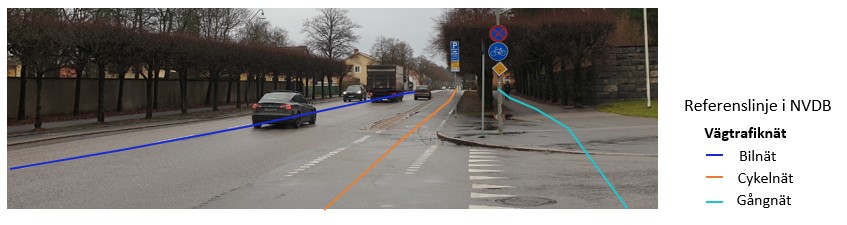
The link should be as straight as possible, and local widenings of paths should be ignored. Where pedestrian and cycle routes share the same area but clearly differ in construction, colour or material, they are drawn as separate links.
In open areas such as squares, car parks and shared spaces, one or more links are drawn along the main routes across the area. Where links cross, they are connected with a node; see Figure 64.
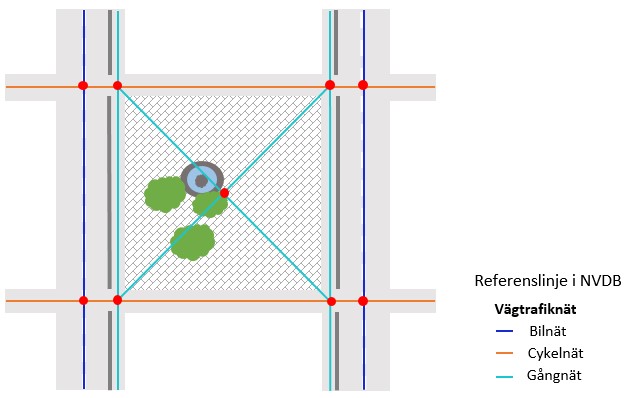
Footway and cycle path links must not wander back and forth across the road link, for example because one line is less accurate than the other. The pedestrian and cycle network must always be on the correct side of the road link, and where the networks run in parallel, the distance between them should be in reasonable proportion to the width of the road.
A vertical route, such as a lift, cannot be drawn in Samgöngunet. The link is therefore given a slight slope, so that its lower and upper ends are about 1 metre apart in the horizontal plane.
A pedestrian crossing and a cycle crossing that run side by side across a street share one reference link; see Figure 65.
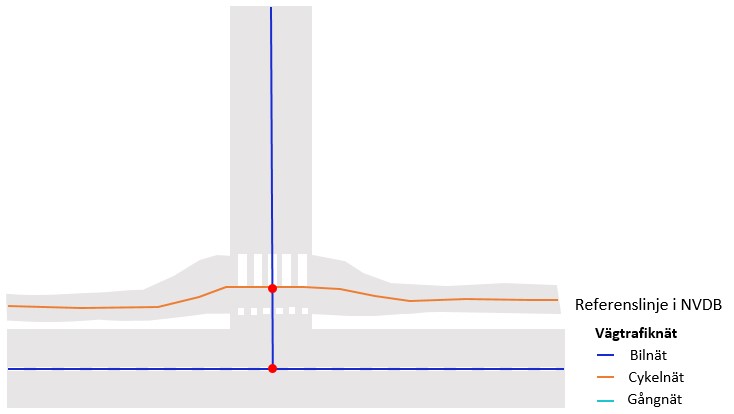
In complex junctions, simple connections may need to take priority over exact position and shape. To keep the number of nodes in the junction to a minimum, the link may therefore deviate slightly from the actual position of the path.
4.3.2Continuity rule
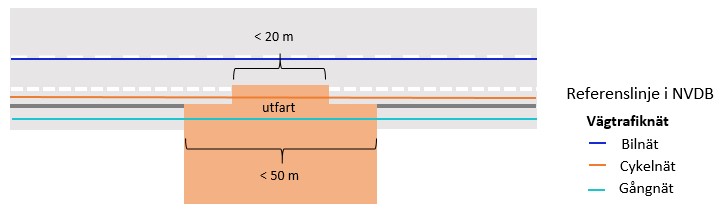
The pedestrian and cycle network aims for continuous links. If a cycle path or footway is interrupted temporarily, for example at a junction, a bus stop or a driveway, the link is still drawn through the junction, past the bus stop or across the driveway. The same applies to footways: the pedestrian route continues across a junction even where there is no marked crossing; see Figure 66.
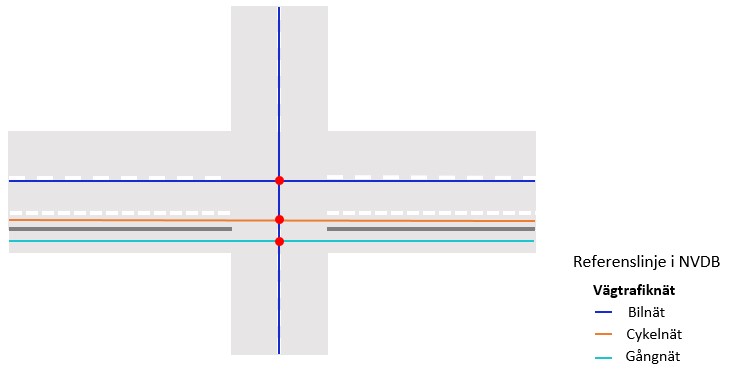
The link is drawn as continuous if the path reappears within:
- 20 metres for cycle paths and cycle lanes,
- 50 metres for footways and footpaths.
4.3.3Node placement
As in the road network, nodes in the pedestrian and cycle network are placed only:
- where routes intersect at grade (the node is placed where the reference links cross),
- at the end of a path or footway,
- where the pedestrian and cycle network connects to the road network.
The difference is that nodes may be as close as 2 metres apart (in the horizontal plane). At lifts, 1 metre is acceptable. This may mean that links sometimes have to be merged into a single node. In the road network the minimum is 5 metres.
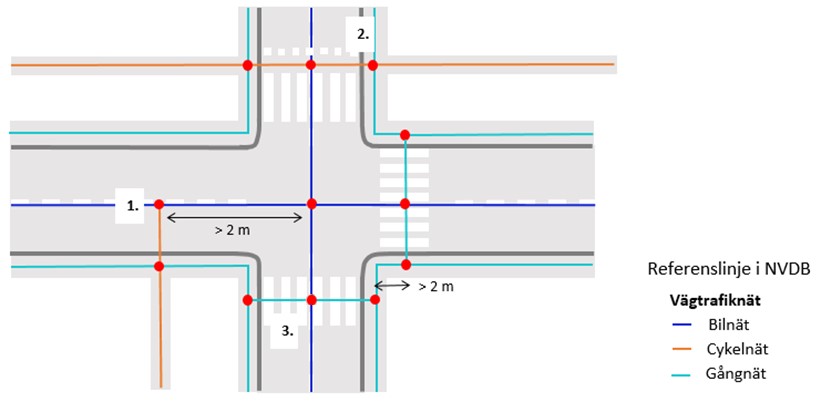
Figure 68 shows:
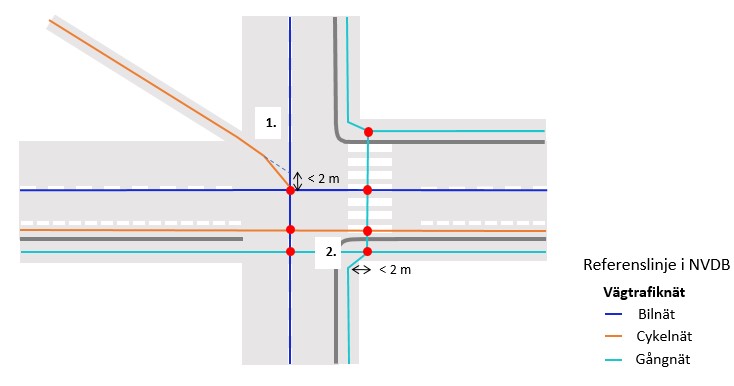
- How a cycle path connects to the road network when the right-angled connection is more than 2 metres from the nearest road node. If the connection would be within 2 metres of an existing node, it is made to that node instead (Figure 69).
- How a pedestrian crossing with an adjacent cycle crossing connects to footways and the road network with nodes.
- That nodes are placed where the pedestrian, cycle and road networks cross at grade.
4.3.4Connecting the pedestrian and cycle network to the road network
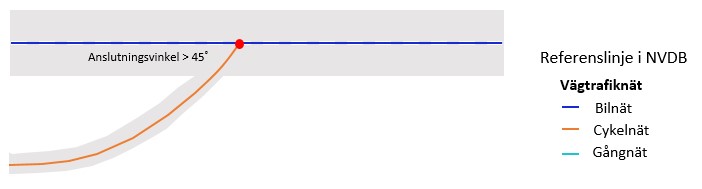
This section describes how the pedestrian and cycle network should connect to the road network. The networks should also be connected where people are likely to continue their journey along the road, even if the path does not actually connect to the road but runs alongside it; see Figure 70.
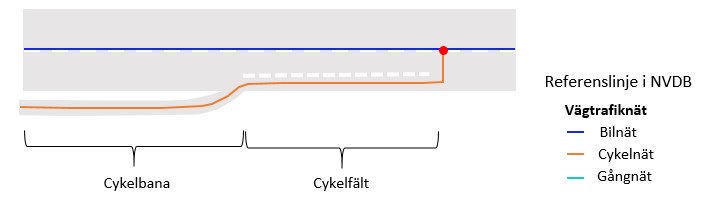
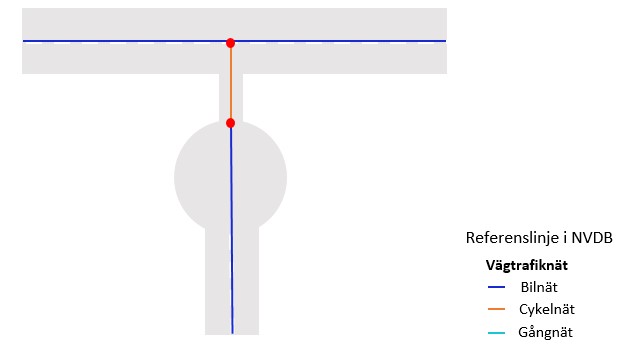
The pedestrian and cycle network should always connect to the road network at turning areas. If the connection would be shorter than 2 metres, the networks are merged into a single node. This can be done in three ways:
- The pedestrian and cycle network is connected to the existing node at the end of the road.
- The road is extended to the pedestrian and cycle network.
- The road is adjusted so that the node lies halfway between the end of the turning area and the centreline of the path.
4.3.5Connecting address points to the network
From every address point there should be clear, unobstructed access at a right angle to some part of the network, at a distance of no more than 5 metres. If the network is further away, the address gets its own reference link from the path to the door; see Figure 73.
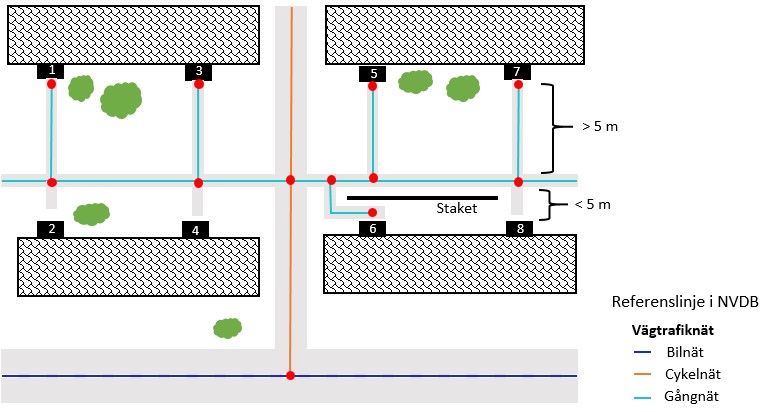
- Addresses 1, 3, 5 and 7 get a reference link from the footpath to the door, because the footpath is more than 5 metres away.
- Addresses 2, 4 and 8 do not get a link, because the footpath is less than 5 metres away.
- Address 6 gets a link even though the footpath is close, because a fence blocks the direct route and the detour is longer than 5 metres.
4.3.6Connections between the pedestrian, cycle and road networks
If the road, pedestrian and cycle networks are not connected, routing can become very confusing for pedestrians and cyclists, who may be sent on detours of several kilometres just to cross the street.
The networks should therefore be connected where appropriate. A node must always be placed where pedestrian, cycle and road links cross at grade, so that pedestrians and cyclists can reach the road network. If a particular mode of travel is not allowed through a connection, this is indicated with the appropriate features.
The pedestrian and cycle network should also be connected to the road network where people may want to continue along the road, even if the path does not actually connect to the road but runs alongside it. Otherwise routing for pedestrians and cyclists becomes unrealistic.
When drawing the pedestrian and cycle network, it is sometimes necessary to also draw roads that would not otherwise be part of the road network, so that the pedestrian and cycle network can be used for routing. These are mostly small private roads and car parks. For example, a car park may need to be drawn so that a path connects to the street. A routing system can only follow registered reference links and make decisions at nodes. It does not know about connections that exist in reality if they are missing from the database; see Figure 74.
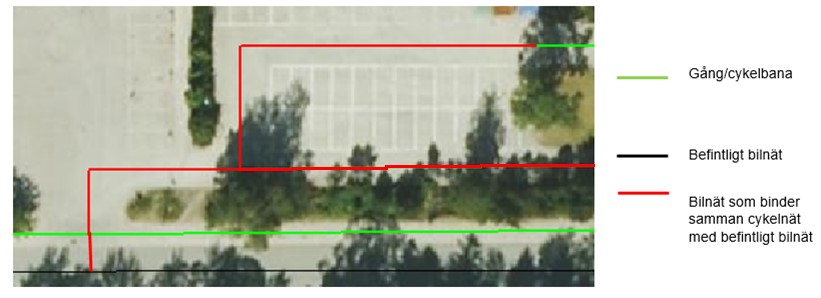
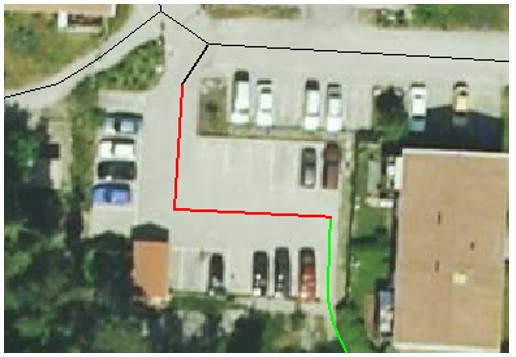
Roads in car parks are part of the road network and must be present to connect the pedestrian and cycle network to the rest of the network; see Figure 75.
4.3.7Roads with advisory cycle shoulders (2-minus-1 roads)
Sweden has a road design called bygdeväg or bymiljöväg (in English, a 2-minus-1 road). It has a single central lane for traffic in both directions and wide shoulders, marked with broken edge lines, for pedestrians and cyclists. Vehicles may drive onto the shoulders when meeting. The design varies; see Figure 76.
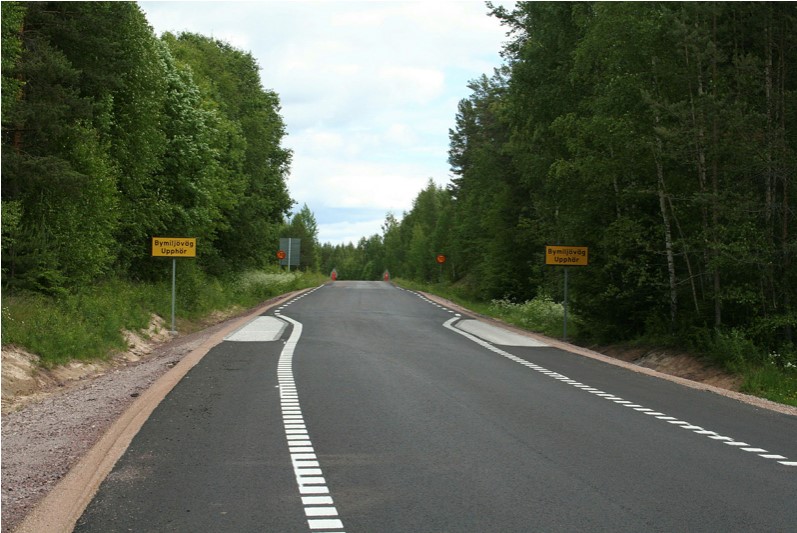
No link is drawn in the pedestrian and cycle network on such roads. Because vehicles may drive onto the shoulders, they do not count as a footpath, cycle path or cycle lane.
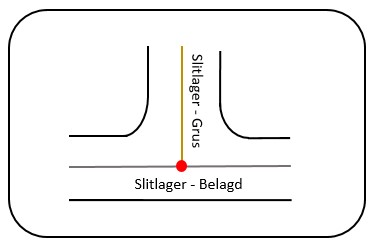
4.4Extent of features
A feature that covers a whole section must always be recorded from node to node. It should reach all the way to the node so that no gaps are created. In Figure 77 the surface “gravel” should reach all the way to the node at the paved road.